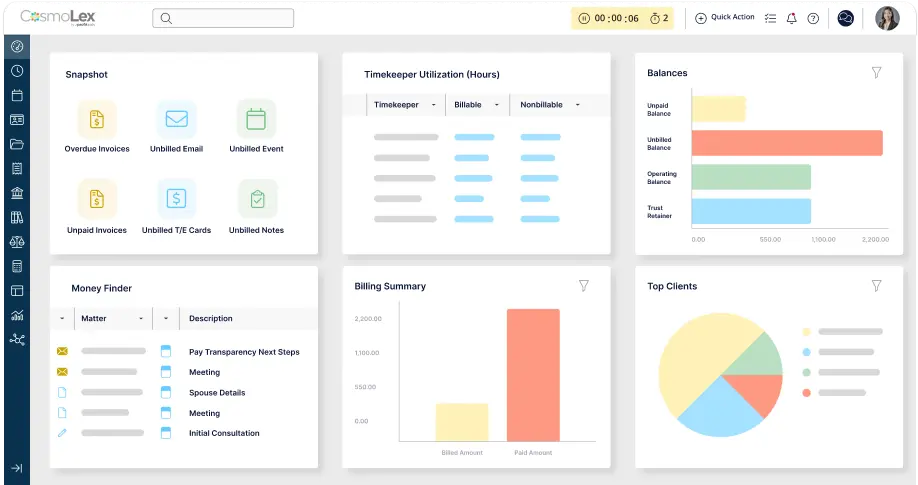
Integrated Accounting Software for Law Firms:
Key Features to Compare

At some point, most firms reach the same tipping point: billing lives in one tool, trust accounting lives somewhere else, and your team is stuck stitching together reports by hand.
Integrated accounting software for law firms changes that by bringing billing, trust accounting, payments, and reporting into a single system.
With one platform keeping everything in sync, data flows cleanly from intake to invoice to reconciliation. Instead of bouncing between platforms, your firm gets one reliable source of truth for financials, matters, and client activity.
When your financial workflows are connected, your firm runs faster, cleaner, and with far fewer costly mistakes.
If you want your team focused on client work, not correcting spreadsheets or reconciling disconnected data, an integrated system is the difference. And the platform you choose determines how much of that work you can truly eliminate.
Why Integrated Accounting Software Makes Sense for Law Firms
Integration is how law firms protect profitability and prevent financial errors at scale.
In many industries, accounting and client management live in different departments. In law firms, those responsibilities overlap constantly. Separating these systems creates extra work, extra risk, and extra cost.
Integrated accounting means combining billing, payments, trust accounting, and financial reporting into one law firm-specific platform to:
- Reduce manual data entry
- Bring records and details into one place
- Improve accuracy and efficiency
- Eliminate duplicate records
- Get real-time visibility into matters, clients, and accounts
With one source of truth, the law firm accounting basics get easier and your firm can trust that every decision is based on accurate, real-time data.
Think about onboarding a typical new client. You need to collect a retainer, store matter documentation, track time, invoice accurately, apply payments, and maintain trust compliance.
When those steps happen across multiple tools, errors multiply quickly and your team spends hours verifying what should already match.
And because legal accounting has higher stakes than most businesses—especially when handling client funds—legal-specific integrated systems matter even more.
Key Benefits of Integrated Accounting Software for Law Firms
Integrated accounting saves time by removing the everyday friction that slows firms down, especially during billing cycles, month-end reconciliation, and audit prep.
Here’s what firms gain when accounting, billing, and trust workflows live in one platform:
- Less manual work: fewer duplicate entries, fewer disconnected records
- Better visibility: real-time insight into profitability, AR, trust balances, and cash flow
- More accurate billing: time entries, expenses, and invoices stay connected
- Cleaner reporting: your firm can trust the numbers without constant double-checking
- Stronger accountability: a clear audit trail tied to matters, clients, and transactions
The biggest benefit of accounting software that integrates with your everyday tools is confidence that your numbers are correct and your firm is protected.
The right system gives partners and staff the same thing: a clear, shared understanding of where the firm stands financially, without digging across tools to find the answer.
8 Essential Features to Look for in Integrated Accounting Software
Not every “all-in-one” tool is truly law firm-ready. The best solutions connect your workflows end to end so compliance, billing accuracy, and matter security stay built in, not bolted on.
You’re not looking for tools with the most features, but platforms designed to remove the weak points in your financial process. Below are the must-have features to look for when evaluating integrated accounting software for law firms.
1. Scalability That Matches Firm Growth
Scalability means your accounting system won’t become your firm’s bottleneck and lets you expand without rebuilding your systems every year.
As your firm grows, your financial workflows only get more complex: more matters, more trust activity, more billing models, and more people touching the process.
A scalable integrated accounting platform supports new practice areas, additional users, more accounts, and more reporting needs without slowing your team down.
2. Real-Time Reporting and Financial Visibility
Real-time reporting turns your accounting system into a decision-making tool, not a rearview mirror.
Firms need faster answers that allow for smarter decision-making based on what’s happening right now, not just last year. Real-time reporting gives you immediate insight into cash flow, AR, billing performance, and matter profitability to guide those decisions.
The most valuable systems also support legal-specific reporting needs like trust recordkeeping and three-way reconciliation, helping you maintain accuracy and reduce audit stress.
3. Automation That Reduces Errors and Speeds Up Billing
Automation protects your firm by making accuracy the default, not the exception.
Each process you automate within your software makes legal accounting more efficient because it keeps your records consistent and your billing process moving without relying on someone to manually connect the dots.
The best systems go beyond basic accounting automation and support full workflow automation, so routine steps like approvals, task handoffs, reminders, and matter-related checklists happen automatically and stay tied to the right client and matter.
Look for automation features like bank feeds, ledger syncing, automated financial statements, and streamlined time capture to keep billing workflows accurate without constant oversight.
When your accounting and legal workflows run in sync, your firm spends less time fixing issues after the fact and more time billing cleanly the first time.
The right automation features won’t just save your team time. They help prevent errors before they reach your ledger or your clients.
4. A User-Friendly Experience for Non-Accountants
Ease of use matters in your accounting software because complex systems lead to preventable errors.
Legal accounting doesn’t only live with the bookkeeper. Attorneys, paralegals, and admins interact with timekeeping, billing, and payment workflows daily.
If the interface is confusing, adoption drops—and when adoption drops, accuracy drops too.
Look for legal-specific accounting software that helps you run your firm more efficiently with:
- Intuitive, clear dashboards that show important details at a glance
- Clear workflows you can automate and repeat for billing, payments, trust tasks, and approvals
- Guided processes that reduce training time and prevent workarounds
- Role-based permissions and matter-level controls so the right people see the right information without slowing anyone down
User-friendliness matters because the easier the system is to use, the more consistently your team follows it—and consistency is where accuracy comes from.
5. Client Portal for Payments and Document Sharing
A client portal is just as beneficial for law firms as it is for clients. With one place to handle file sharing, eSignature, and payments, it accelerates cash flow and strengthens client trust.
When your accounting software includes this feature, it essentially acts as a limited Client Relationship Management (CRM) tool that keeps all forms, documentation, and messaging centralized. A secure client portal allows clients to:
- Make online payments quickly via credit card, ACH, or digital wallet
- Upload and access documents securely
- Communicate with the firm
- Keep all records automatically tied to the right matter
When payment and documentation live in the same ecosystem as billing and accounting, your firm gains speed without sacrificing oversight.
When you’re comparing tools, the fastest way to know if a system fits your firm is seeing the full workflow—from intake to invoice to trust reconciliation. Watch how CosmoLex simplifies it all.
6. Built-In Reconciliation Tools
Reconciliation is where financial integrity gets proven. Matching payments, invoices, and trust activity manually takes time and creates room for mistakes.
Integrated software for legal and trust accounting should simplify reconciliation with pre-defined workflows that ensure no step is missed, audit-ready record trails, and tools that make it easy to confirm records are correct across accounts (three-way reconciliation).
Reconciliation is how your firm stays audit-ready. Your software should make it simple and repeatable.
7. Strong Security and Permission Controls
Security is the foundation of every client relationship, and it starts with your accounting software. Firms manage highly sensitive information, and access shouldn’t be all-or-nothing.
Look for features like data encryption, tokenization, two-factor authentication, and matter-level permissions so staff only see what they’re authorized to access in any integrated accounting tool.
The most secure accounting systems build compliance and data protection into everyday workflows without adding complexity.
8. True Integration Across Legal Tools
The goal of using integrated software for law firm accounting is to reduce the number of systems your firm relies on and ensure that any integrations you do use are clean and consistent.
Your accounting platform should keep client and matter data synced and easily integrate with other tools you use daily:
- Time and expense tracking software
- Billing and invoicing tools
- Complete practice management software
- Payment processing tools
This is how your firm ensures no one wastes time constantly reconciling systems against each other. The right integration strategy eliminates duplicate data and makes every workflow more reliable.
Compliance Advantages: Protect Client Funds and Reduce Risk
Legal accounting has stricter requirements than general business accounting because mishandling client funds can trigger serious ethical and regulatory consequences.
Integrated accounting software designed for law firms should combine legal accounting and trust accounting tools in one place. This integration helps you stay compliant by keeping trust activity separate, tracking every transaction, and supporting required trust and operating accounting processes.
Look for features that help prevent the most common trust accounting mistakes for easier compliance: those that safeguard against commingling, simplify three-way reconciliation, and provide an audit-ready history of every trust transaction.
With one platform keeping your firm compliant and ensuring accurate recordkeeping, you can better protect your license and reputation.
Choosing the Right Integrated Accounting Software for Your Firm
Lawyers often shop for accounting software by a checklist, then realize too late that the workflows don’t match how legal work actually happens within their firm.
Instead of focusing on surface features, evaluate each option based on how it supports your firm’s real priorities:
- Does it support trust accounting and compliance without extra tools?
- Can it connect time tracking, billing, payments, and reporting seamlessly?
- Will attorneys and staff actually use it daily without resistance?
- Does it provide audit-ready reporting when you need it?
- Will it scale with your firm’s growth and evolving billing models?
The right software fits your workflows today and has safeguards in place to prevent financial chaos tomorrow.
If you want a strong evaluation starting point, review the fundamentals first (and what firms often miss).
To recap, look for an integrated platform that includes:
- Trust accounting + compliance safeguards (including three-way reconciliation and audit trails)
- Billing, payments, and time capture in one connected flow
- Automation and workflow tools that reduce errors and keep work moving
- Real-time reporting and financial visibility you can access in a few clicks
- Security and role-based permissions that protect client and matter data
- A user-friendly experience that supports adoption across attorneys and staff
- Scalability and integration support so the system grows with your firm
If it’s software built for law firms, it should make accounting easier and more reliable.
Getting Started with Integrated Accounting Solutions
Software only saves time when your team actually uses it the same way, every day.
Once you’ve selected a system, success comes down to implementation and adoption. The goal is a smooth transition that improves accuracy from day one, not a long adjustment period filled with exceptions and workarounds.
Here’s how to approach rollout in a way that sticks.
Evaluate Options Based on Your Firm’s Workflows
The best evaluation question is simple: does this system reduce steps or add them?
Start by mapping your current process: intake, retainers, billing cycles, payment collection, trust accounting, and reconciliation. Then evaluate software based on whether it reduces steps and removes manual work.
Look for features that make your processes repeatable and mistake-resistant: workflow automation, built-in task templates, and guided checklists that keep everyone on the same path. These are the features to prioritize first, because they reduce friction and prevent workarounds.
The closer the system matches how your firm operates, the easier it will be to adopt quickly and the faster you’ll see ROI.
Train for Real Adoption, Not Just Basics
Training should focus on the workflows your team will use daily, not just “where to click.” Build short, role-based training sessions your team can reference later and reinforce repeatable processes so staff aren’t guessing.
With tools designed for legal teams, training becomes easier because workflows are aligned to law firm needs from the start. But adoption still depends on one thing: showing your team exactly how the system makes their day easier.
Review Performance Regularly to Stay Ahead of Risk
Ongoing review is what keeps a good system from becoming a risky one. Even strong systems need consistent oversight.
Schedule regular reviews for trust accounting procedures, security controls and permissions, reporting accuracy, and workflow adoption, especially after staff changes or firm growth.
The best platforms make auditing easier by providing clear trails and built-in compliance support.
As you research software options, make sure your chosen tool meets your firm’s unique requirements.
- Does the new software easily integrate with other tools you use?
- Will it be easy for all members of your team to adopt?
- Does the pricing make sense for the value you’ll receive?
The closer your software is to meeting your exact needs (and evolving ones), the easier it’ll be to increase efficiency from the start.
One System. Cleaner Accounting. Stronger Firm Performance.
The power of integrated accounting is simple: one source of truth, fewer mistakes, and more control as your firm grows.
Your firm works more efficiently with fewer gaps between the tools you use. When billing, payments, trust accounting, and reporting live in one integrated system, your firm spends less time fixing errors, chasing information, and second-guessing the numbers.
CosmoLex helps law firms streamline day-to-day accounting, simplify billing workflows, and maintain trust compliance with a fully integrated practice management solution built specifically for law firms.
Ready to get your firm in sync? Start your 10-day free trial with CosmoLex—no credit card required. Or, if you want to see the full workflow in action, get a personalized demo now.